

taskrail
A live board of your session's plan, right above the prompt.
The Problem
When Claude works through a plan with several tasks, the state of each one lives in the transcript: what is done, what is in review, what is waiting on you. You scroll, you ask, you lose the thread.
The Solution
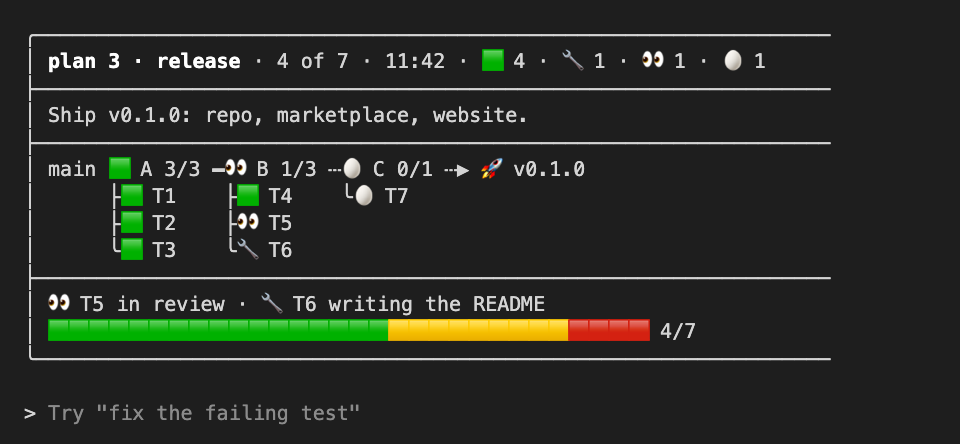
taskrail draws the plan as a board above the prompt: a rail with one station per wave, the tasks under each station with their icon, the key line and a progress bar. Claude updates it through three tools; you pick how much of it you see with /taskrail.
Why taskrail?
The board is a part of the session, not a file Claude reads: the model keeps it current and the band draws it.
| The usual way | taskrail | |
|---|---|---|
| 📋 | The state of a plan scattered through the transcript | One board, always visible, above the prompt |
| 👀 | Asking "where are we?" and reading a wall of text | A glance at the rail: which wave, which task, which icon |
| 🔄 | A progress note that is gone when you close the terminal | The plan comes back with /resume, even after a restart |
| 🔒 | A status script that reads and writes files on your disk | No files, no network: the plan lives inside Claude Code |
Features
The Board in the Band
Header with the counts, the plan's description, the rail with one station per wave, the tasks under each with their state icon, the key line and a thirty-tile progress bar.
Four Modes
full shows the whole board, bar one line, both adds the board to the chat at every milestone, off hides it. /taskrail switches, and the choice is kept across sessions.
Three Tools for Claude
plan starts a board, set updates icons and texts, show returns it as text. Each result tells Claude what the current mode asks of the chat, so it never reads a settings file.
Comes back with /resume
The plan is kept in the session's state and in the plugin store, so /resume and a restart of Claude Code followed by --resume bring the same board back. /clear starts over and takes the plan with it.
No Network, No Files
taskrail opens no connection and reads or writes nothing on disk. There is nothing to configure and no credential to store.
Readable Source
Three TypeScript files, no build step, no dependency, and a test suite that runs with claude plugin test.
How It Works
A Claude Code mod: a plugin whose hooks module runs inside the session, with access to the state, the store, the tools and the band above the prompt.
The board is a pure function from the plan to the lines the band draws. The plan lives in the plugin's reactive state, so every change redraws the band, and in the plugin store under the session id, so it outlives the session's memory. The tools are plain functions over that plan; the command only changes the mode.
Quick Start
Two commands from the Drolosoft marketplace. Nothing to build.
- Add the Drolosoft marketplace:
claude plugin marketplace add drolosoft/claude-plugins. - Install the mod:
claude plugin install taskrail@drolosoft-marketplace. - Start a new session or run
/reload-plugins./pluginlists it as 1 mod active · taskrail, and the board appears the next time Claude runs a plan.
From a local copy
For one session with your own working copy, with reload on every save.
Modes
/taskrail alone answers the current mode.
| Command | What the band shows |
|---|---|
/taskrail full | The whole board: header, description, rail, tasks, key line and progress bar (the default) |
/taskrail bar | One line: project, plan, time, a station per wave, the goal and ten tiles |
/taskrail both | The whole board, and Claude also pastes it in the chat at every milestone |
/taskrail off | Nothing in the band; Claude shows the board in the chat only when you ask |
Requirements
Claude Code with mods. That is all.
| Requirement | Detail |
|---|---|
| Claude Code | 2.1.287 or later |
| Where it runs | The terminal, the IDE extensions and the desktop app's Code tab. Not the VS Code chat panel, claude -p or cloud sessions |
| Network | None. The mod never opens a connection |
Built With
A small mod, written out in the open.
- TypeScript: one hooks module and one drawing module, no build step
- The Claude Code mod API: state, store, tools, a command and the band above the prompt
- claude plugin test: the suite runs in the mod's own environment, locally and on every push

I build tools I wish existed, then give them away.
If one of them saved you time, a coffee keeps the next one coming.

Your plan, always in sight
taskrail is free and open source. Two commands and the board is above your prompt.