


Gotify Commander
A remote control for your servers. The first Gotify plugin that talks back.
The Problem
You’re on a walk. Your phone buzzes — a service needs a restart. With any other setup, you’d need a laptop, a terminal, and an SSH session. The walk is over.
The Solution
With gotify-commander, you tap restart nginx and get ✓ nginx restarted. Same app you already use for alerts — now it talks back. No laptop, no SSH, no terminal. Walk continues.
Features
23 Commands, 6 Categories
Restart services, check disk, view logs, analyze traffic, locate your phone — all from the Gotify app you already use.
Web Control Panel
A browser dashboard built with Pico CSS. Live service status grid, one-click restart/stop/start, command history, system metrics — all driven by your YAML config.
Unified App Architecture
Commands and responses flow through a single Gotify app. Send a command, get the reply as the next notification. No separate channels to manage.
Multi-Machine
VPS services via systemctl, Mac Mini services via SSH + launchctl. Target any machine by name — free mac, uptime vps.
Security-First
Tailscale VPN + Gotify login + random plugin token. Command whitelist only — no shell passthrough, no injection, configurable timeouts. Reboot requires explicit target.
GPS Locate & Analytics
Locate your devices with locate. Analyze traffic with rhit, web analytics with GoAccess. TLS cert checks, DNS lookups, HTTP health probes.
Dynamic YAML Config
Add a service to YAML — it appears in commands, web UI, and status reports automatically. Categories, domains, ports, aliases, favicons — all config-driven.
First Bidirectional Plugin
Every existing Gotify plugin is one-way — forward to Telegram, Slack, or email. gotify-commander closes the loop: type a command, get the result back.
Architecture
gotify-commander loads as a native Gotify plugin (.so). It intercepts messages on a unified command app, executes the matching whitelisted command, and sends the result back as a notification on the same app.
The plugin runs inside the Gotify server process — no separate daemon, no extra ports, no external dependencies. Commands dispatch to local systemctl, remote SSH/launchctl, or diagnostic tools as configured in YAML. The web UI is served at the plugin's webhook path.
Quick Start
Download the plugin binary, drop it into Gotify's plugin directory, and restart. Under two minutes.
Command Reference
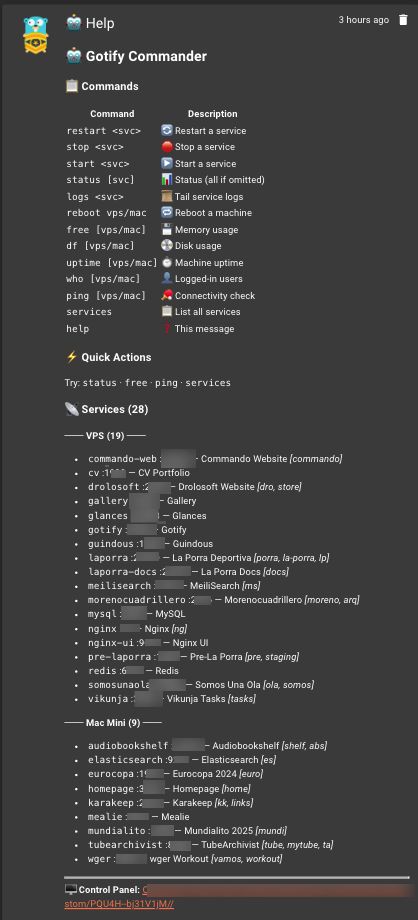
23 commands organized across 5 categories. All accept aliases and machine targets.
🔄 Service Management (7)
| Command | Args | Description |
|---|---|---|
status | [service] | Status of all services, or a specific one |
restart | <service> | Restart a service (supports aliases) |
start | <service> | Start a service |
stop | <service> | Stop a service |
logs | <service> | Tail the last N lines of service logs |
services | — | List all managed services |
help | — | Show all commands and configured services |
📊 System Diagnostics (9)
| Command | Args | Description |
|---|---|---|
free | [vps|mac] | Memory usage |
df | [vps|mac] | Disk usage |
uptime | [vps|mac] | System uptime + load average |
top | [vps|mac] | Top processes by CPU/memory |
who | [vps|mac] | Currently logged-in users |
ping | [vps|mac] | Health check — responds with "pong" + latency |
ip | [vps|mac] | IP addresses |
ports | [vps|mac] | Open listening ports |
connections | [vps|mac] | Socket statistics |
🌐 Monitoring & Analytics (4)
| Command | Args | Description |
|---|---|---|
traffic | [service] | Nginx traffic analysis via rhit |
analytics | — | Web analytics summary via GoAccess |
certs | — | SSL certificate expiry for all domains |
updates | — | Pending system updates (apt) |
📍 Location (1)
| Command | Args | Description |
|---|---|---|
locate | <lat> <lon> | GPS reverse geocoding via OpenStreetMap |
⚠ Danger (2)
| Command | Args | Description |
|---|---|---|
reboot | <vps|mac> | Reboot a machine (requires explicit target) |
shutdown | <vps|mac> | Shutdown a machine (requires explicit target) |
Universal aliases: mem/memory → free · disk/space → df · log → logs · up → uptime. Typing just a service name is treated as status <service>.
Why Gotify Commander?
Every other Gotify plugin forwards notifications somewhere else. This one lets you act on them.
| gotify-commander | Telegram Bot | Uptime Kuma | |
|---|---|---|---|
| Self-hosted | ✅ | ❌ | ✅ |
| Bidirectional | ✅ | ✅ | ❌ |
| Runs inside Gotify | ✅ | ❌ | ❌ |
| No third-party services | ✅ | ❌ | ✅ |
| Service management | ✅ | varies | ❌ |
| Multi-machine (SSH) | ✅ | varies | ❌ |
| Web control panel | ✅ | ❌ | ✅ |
| Traffic & analytics | ✅ | ❌ | ❌ |
| GPS locate | ✅ | ❌ | ❌ |
| Tailscale security | ✅ | ❌ | ❌ |
| Phone app already installed | ✅ | ✅ | ❌ |
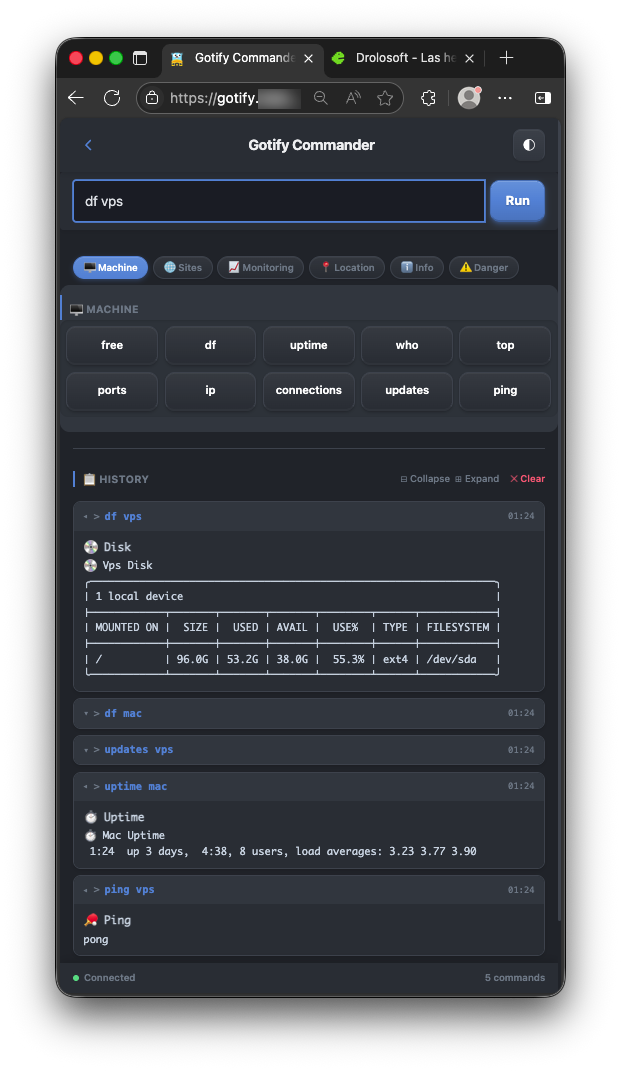
Web Control Panel
A browser dashboard built with Pico CSS that lives at https://your-domain/plugin/gotify-commander/.
- Live service status grid — all services grouped by category, color-coded ✅ / ❌
- One-click restart / start / stop for any service
- Command history with timestamps and results
- System metrics (memory, disk, uptime) at a glance
- Dynamic favicons fetched from service domains
- Dynamic categories from your YAML config — no hardcoding
Access is secured through your existing Gotify login. No extra credentials.
Configuration
All configuration lives in a single YAML file, editable through the Gotify WebUI. Define your services, categories, machines, domains, and aliases. Add a service — it appears everywhere.
Security
- Tailscale VPN — all SSH and HTTP traffic encrypted peer-to-peer, never exposed to the public internet
- Gotify login — web UI is gated behind your existing Gotify authentication
- Command whitelist — only registered commands execute; no arbitrary command execution
- Input sanitization — most commands use
exec.Command; the few requiring a shell validate all input with strict regex - Input sanitization — service names must match
^[a-zA-Z0-9_-]+$ - Execution timeouts — configurable (default 30s), prevents runaway processes
- SSH key-only auth — password auth not supported
- Reboot requires explicit target —
rebootalone returns an error, preventing accidental reboots - Audit trail — every command logged: timestamp, command, source, result, duration
Platform Compatibility
gotify-commander runs wherever Gotify runs. The plugin binary is compiled for each target architecture.
| Platform | Architecture |
|---|---|
| Linux | amd64 |
| Linux | arm64 |
| Linux | arm/v7 |
Built With
A single Go plugin (.so) with no runtime dependencies beyond Gotify itself.
- Go Plugin (.so) — Loads natively inside Gotify server
- Gotify Plugin API — First-class integration, no hacks
- SSH — Remote machine management via standard SSH
- YAML Config — Human-readable, WebUI-editable
- Pico CSS — Minimal, semantic web UI with zero JS frameworks
- Gin — Lightweight HTTP router for the control panel

I build tools I wish existed, then give them away.
If one of them saved you time, a coffee keeps the next one coming.

Ready to manage your servers from your phone?
gotify-commander is free, open source, and ready to use with your Gotify instance.