


SoundInbox
Stop checking email. Start hearing what matters.
The Problem
A critical email is coming today — a contract, a payment, an approval. So you check your inbox every ten minutes. Thirty-seven times for thirty-six emails that didn't matter. Each check costs you focus you never fully get back.
The Solution
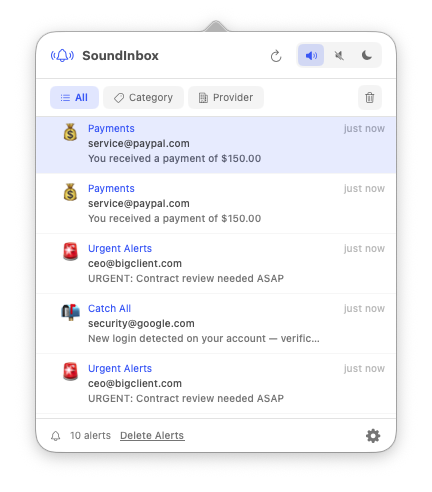
Payment received? Cash register. Urgent client? Alarm. Everything else? Silence. SoundInbox fires the exact sound you defined for the exact event you care about. Stop checking — start hearing.
An email arrives. A formula matches. You hear it. Done.
How It Works
Features
Formula Gallery
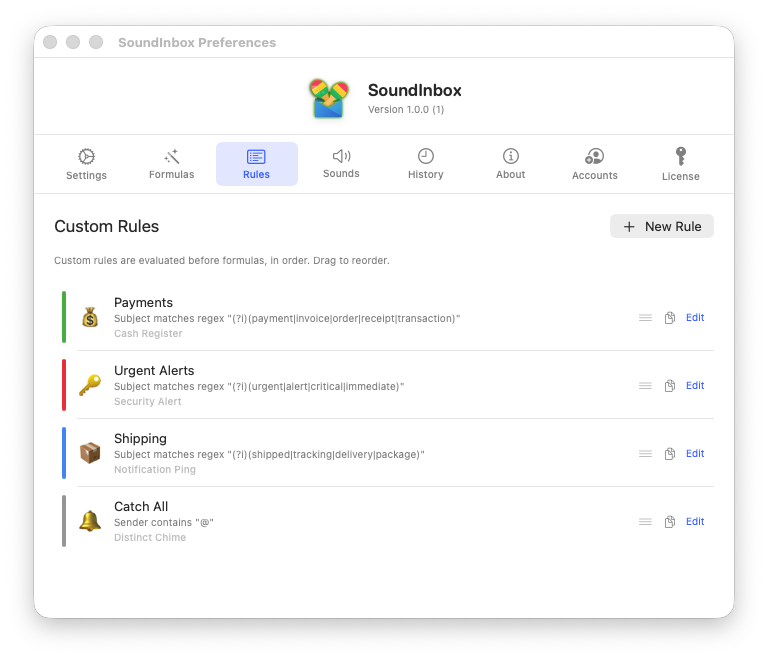
10 pre-built detection formulas — payments, sales, urgent, shipping, security, and more. Toggle them on and start hearing alerts immediately. Zero configuration.
Custom Rule Engine
Build your own rules with AND/OR logic, regex matching, domain filtering, and per-field conditions across sender, subject, body, and recipient.
Sound Library
15 curated alert sounds — from a cash register cha-ching to a zen water drop. Each under 3 seconds, distinct, and non-intrusive.
Match History
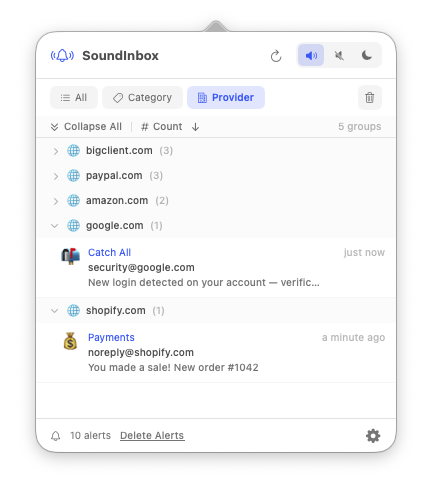
A scrollable timeline of every alert fired, with stats on most active formulas and busiest hours of the day.
Silent by Default
Unmatched emails produce no sound. You opt in to noise, not out of it. Only what you define as important makes a sound — everything else stays quiet.
Invisible Until Needed
No dock icon. No main window. Lives in the status bar doing its job — you forget it's there until the right sound plays at the right moment.
10 Pre-Built Formulas
Each formula is a curated set of conditions that detect a specific category of email. One tap to activate. Nothing else required.
| Formula | Detects | Sound | |
|---|---|---|---|
| 💰 | Payment Received | PayPal, Stripe, Wise, bank transfers | Cash Register |
| 🛒 | New Sale | Shopify, WooCommerce, Gumroad, Etsy | Victory Chime |
| ✅ | Approved / Confirmed | approved, accepted, confirmed | Soft Success |
| 🚨 | Urgent Client Email | URGENT, ASAP, critical | Alarm Pulse |
| 📦 | Order Shipped | shipped, tracking, on its way | Notification Ping |
| 📩 | VIP Sender | User-defined whitelist | Distinct Chime |
| 🧾 | Invoice Received | invoice, factura, bill | Paper Slide |
| 🔑 | Login / Security | login, password, 2FA | Security Alert |
| 📅 | Meeting / Calendar | invitation, meeting, scheduled | Calendar Ping |
| 🤫 | Everything Else | Catch-all — silent by default | Silent |
15 Curated Sounds
Every sound is under 3 seconds, distinct, and non-intrusive — covering a wide range from subtle and informational to urgent and celebratory.
| Sound | Description | |
|---|---|---|
| 💰 | Cash Register | Classic mechanical register — money sound |
| 🏆 | Victory Chime | Short ascending melody — celebratory |
| ✅ | Soft Success | Gentle two-tone confirmation — calm |
| 🚨 | Alarm Pulse | Repeating electronic pulse — urgent |
| 📦 | Notification Ping | Clean single ping — neutral |
| 🔔 | Distinct Chime | Bell-like — attention-grabbing |
| 🧾 | Paper Slide | Paper-shuffle — subtle |
| 🔑 | Security Alert | Low two-tone — serious |
| 📅 | Calendar Ping | Light marimba — friendly |
| 💬 | Message Pop | Soft pop — messaging style |
| 📣 | Trumpet Fanfare | Micro fanfare — major wins |
| 🌊 | Ocean Drop | Water drop — zen |
| ⚡ | Electric Spark | Electric zap — energetic |
| 🎵 | Marimba Up | Ascending marimba — cheerful |
| 🔇 | Silent | No sound — suppresses audio |
Your Data Stays on Your Mac
SoundInbox polls your inbox via the official Gmail API and evaluates rules locally. No email content is stored, transmitted, or processed on any server. OAuth tokens live in the macOS Keychain. Match history is local and you can clear it anytime.
Why SoundInbox?
| Without SoundInbox | With SoundInbox |
|---|---|
| Check email every 5 minutes | Hear when it matters, ignore the rest |
| Same notification for spam and payments | Different sound for each formula |
| Get distracted reading every email | Know what arrived without looking |
| Miss important emails in the noise | VIP senders always cut through |
| No way to silence work email after hours | Mute with one click, resume anytime |
Download
Ready to hear what matters?
Download SoundInbox and let your inbox talk to you
Download the DMG, drag to Applications, done. Universal binary — no Electron, no dependencies.
Download DMGSimple Pricing
Already love it? Unlock multi-account.
Free — $0
forever
Everything you need for one email account.
- All formulas and custom rules
- All 15 sounds + custom uploads
- Regex matching, speech alerts, DND
- Match history and statistics
- 1 email account
Pro — $9.99
one-time, yours forever
Monitor work, personal, and client inboxes together.
- Everything in Free
- Up to 5 email accounts
- Activate on up to 3 Macs
- No subscription, no expiration
FAQ
Is there a subscription?
No. $9.99 is a one-time payment. You own the license forever. No annual fees.
What if I don't upgrade?
Free works forever with one account. All formulas, all sounds, no limits on rules. Pro just adds more accounts.
Does SoundInbox read my emails?
Only headers — sender, subject, and a short snippet. No email body is ever read, stored, or sent anywhere. Everything stays on your Mac.
Can I get a refund?
Yes. 30-day no-questions-asked refund. Email support@drolosoft.com.
Does it work offline?
SoundInbox needs internet to poll Gmail. But the license works offline — activate once, then it runs without checking the server for 90 days.
Built With
Fully native. No Electron, no web wrappers, no cross-platform frameworks.
- Swift 6.3 — strict concurrency, modern async/await
- SwiftUI + AppKit — NSStatusItem, NSPopover, native menus
- AVAudioPlayer — system audio with macOS sound fallback
- macOS 14+ — built for the latest Apple platform features
Stop checking. Start hearing.
Get back the time you spend monitoring email. Let the right sound tell you when to look.